Fine-Tuning Statistics Requests
This document outlines the workflow for Fine-Tuning an existing Statistics Request to optimize strategy performance at a reduced cost.
What is Fine-Tuning?
Fine-Tuning allows you to take a successfully calculated Statistics Request (referred to as the Parent Request) and modify its Statistics parameters without needing to re-upload data from Sierra Chart.
Since the historical price data is already processed and stored on our servers, these requests are calculated at a 50% discount of the standard Statistics Trade Credit (STC) price.
Key Constraints and Capabilities
To maintain the integrity of the data, certain rules apply to the Fine-Tuning process:
- Fixed Parameters (Locked): Any settings originating from Sierra Chart, such as Session Times, Data Limiting, Timeframes, and Signal Logic.
- Adjustable Parameters (Flexible): All server-side Statistics Settings, including Trailing Stops, Move-to-Breakeven rules, Trading Windows, Risk Management parameters and more.
To see all Statistics Settings, follow this link! You can modify anything from this setting type.
How to Submit a Fine-Tuning Request
Accessing the Fine-Tuning Overview
To begin the optimization process, locate the original request you wish to refine:
- Navigate to the My Statistics Requests page within the Tick2Tick Dashboard.
- Identify the Request you want to optimize and click the Fine-Tune button in the Navigation column.
- You will be directed to the Fine-Tuning Overview page for that specific Parent Request.
Analyzing the Overview Page
The Overview page serves as a centralized dashboard to compare iterations:
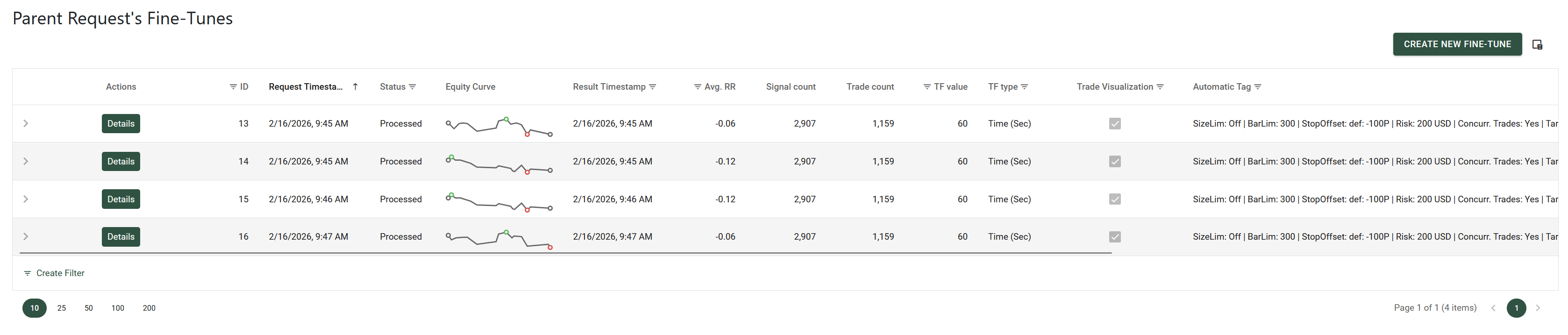
- Parent Request's Fine-Tunes: A comprehensive list of all iterations derived from the Parent Request.
- Performance Comparison: A side-by-side breakdown of key metrics comparing the Parent Request against its top-performing Fine-Tune.
- Equity Curves: Visual overlays showing the equity graph of the Parent versus the best Fine-Tune.
- Metadata Summary: Quick access to the original settings and metrics of the Parent Request.
To crete a new Fine-Tune, click the CREATE NEW FINE-TUNE button in the top-right corner of the Parent Request's Fine-Tunes section.
Example of the Fine-Tunes of a Parent Request:
Submitting a New Fine-Tune
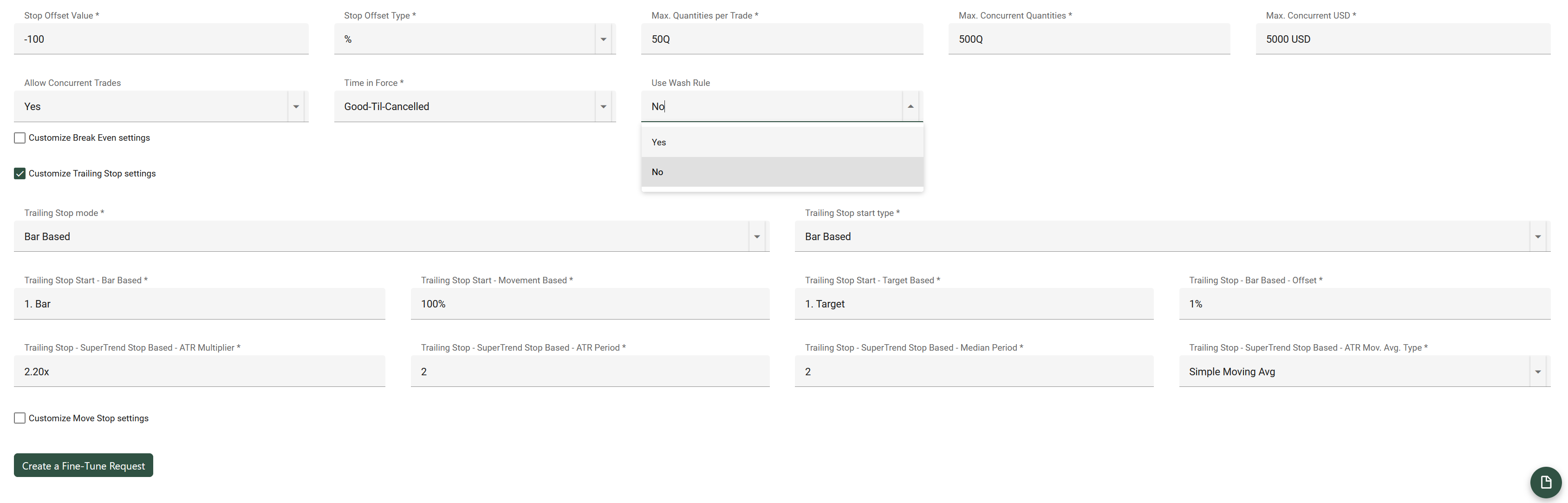
On the New Statistics Request Fine-Tuning page, you can define your optimized parameters:
- Select Base Configuration: Use the
Now Fine-Tuningdropdown to select your starting point. You can base your new settings on the original Parent Request or any existing Fine-Tune iteration. - Adjust Settings: Configure the Statistics Settings as desired.
- Review and Submit: Click Create a Fine-Tune Request to audit your changes. Once verified, submit the request.
Updating settings inside the New Statistics Request Fine-Tuning page:
Note: Upon successful submission, you will be redirected to the Fine-Tuning Overview page. You can monitor the calculation progress here or back on the main My Statistics Requests page.