Merging Statistics Requests
This guide explains how to combine two or more calculated Statistics Requests into a single Merged Request.
This feature is essential for simulating portfolio performance and understanding how running multiple strategies concurrently impacts your total equity and risk exposure.
What is a Merged Request?
A Merged Request aggregates the processed Trades from multiple successfully calculated Statistics Requests and treats them as a single, unified entity.
By nesting these strategies under one umbrella, you can analyze:
- Combined Drawdown: How overlapping losses between strategies affect your account.
- Correlation: Whether your strategies complement each other or increase systemic risk.
- Portfolio Equity: The simulated growth of an account trading all selected signals simultaneously.
Creating a New Merged Request
To merge your strategies, navigate to the My Statistics Requests page and follow these steps:
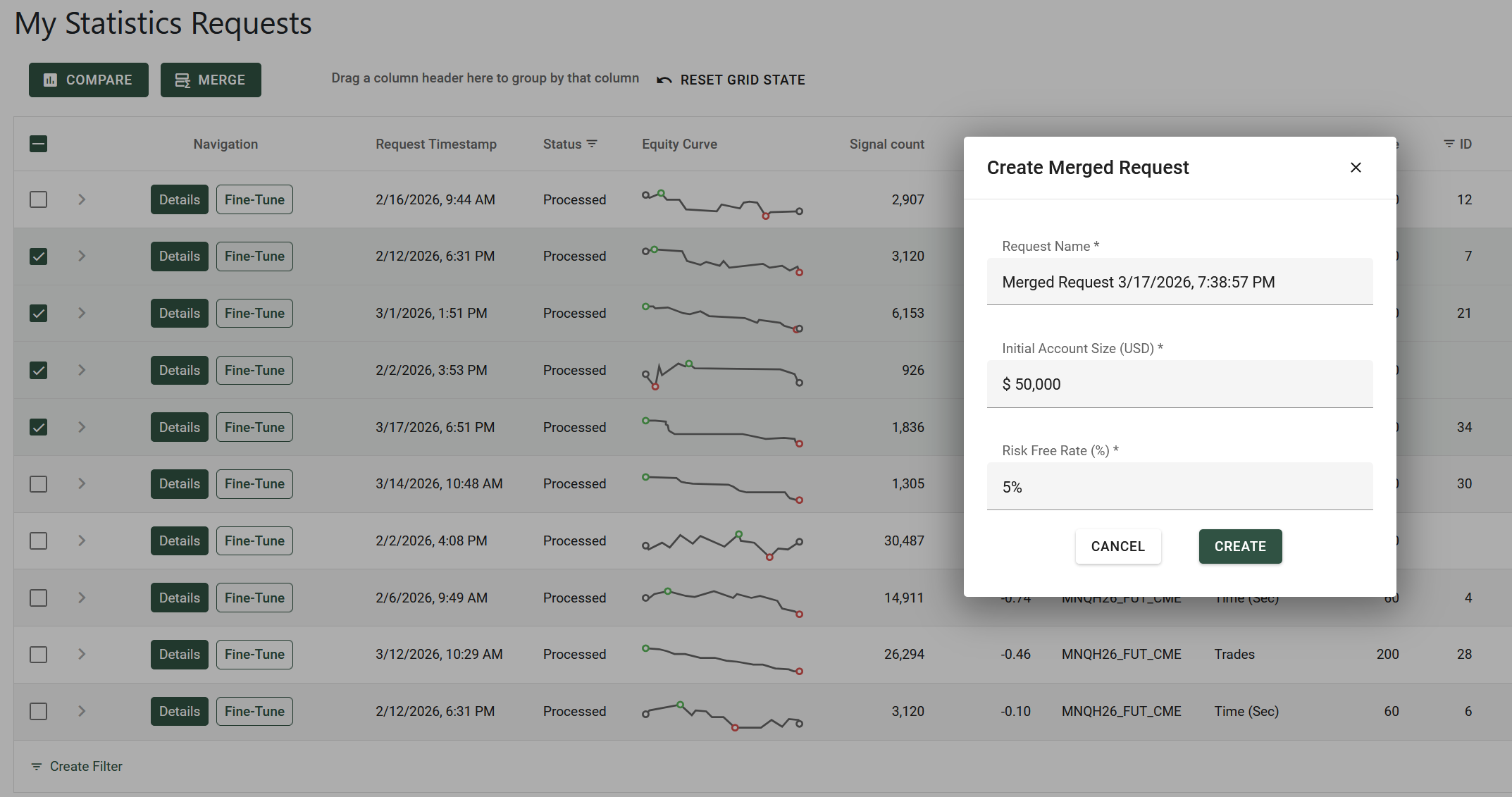
- Select Requests: Activate the checkbox on the left-hand side for two or more Request rows you wish to combine.
- Initiate Merge: Click the Merge button located in the action bar at the top left of the data grid.
- Configure Parameters:
- Name: Assign a unique name to the Merged Request.
- Initial Capital: Define the starting capital for the combined simulation in USD.
- Risk-Free Rate: Set the benchmark rate for Sharpe Ratio and other calculations.
- Analyze: Once submitted, you will be redirected to the dedicated Merged Request dashboard where the aggregated metrics are displayed.
Example of creating a Merged Request:
Accessing the Merged Requests List
While individual Statistics Requests are kept on the My Statistics Requests page, your Merged Requests are stored separately to maintain a clean workspace.
To view your list of combined strategies:
- Locate the Navbar at the top of the Tick2Tick Dashboard.
- Click on the Statistics dropdown menu.
- Select Merged Requests from the list or follow this link.
Details Page
Similar to a standard Statistics Request, a Merged Request features a comprehensive Details page containing equity curves, trade lists, and periodic analysis.
For a deep dive into how to interpret these metrics, please refer to the Viewing a Request's Details documentation.
Note: Merging Requests does not alter the original Parent Requests, it simply creates a new virtual view of the combined data.